Software and Data

This pages contains descriptions of publicly-available software developed during this project. Also see the above menu for CEBL: System for On-Line EEG Analysis , our C++ software for recording EEG and performing brain-computer interface experiments on-line.

Topics

EEG Sonification

First, some fun. Want to hear what EEG signals sound like? Check out these examples of EEG sonification. (Don't you like that word? It isn't even in Websters!)

We wrote eegToTones.m in Matlab to convert EEG frequencies (in the range from 5 to 90 Hz) to audible frequencies to perform some biofeedback experiments. To test the code, we applied it to pre-recorded EEG signals recorded when subjects were performing various mental tasks.

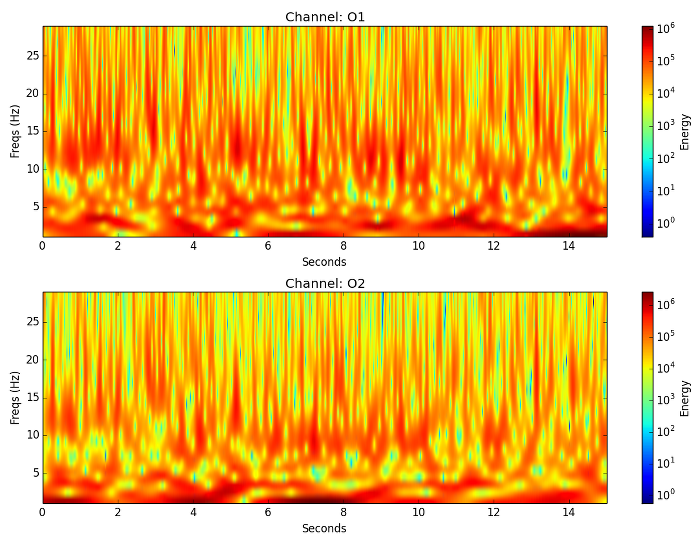
Here are some examples of the results. Images are spectrograms, Fourier transforms of overlapping windows in time of the EEG signal. The span of time from left to right is 10 seconds. Click on an image to hear its sonification.

60 Hz Noise
Rotation Task, Channels O1 (left) and O2 (right)
Resting Task, Channel O1, Different Trial, with Eye blink
Counting Task, Channel O1

to top of page

Classification with cross-validation

We have used Matlab in a number of ways in our work with EEG. This section includes links to some of the code we have developed. There is currently little organization to this section, except that material is presented in reverse chronological order.

This code is not well-documented and considerable modification will have to be made to tailor it for your use. It is available as is, with no hope of support from us. If you find it useful, please acknowledge us for whatever help it provides. Our website can be acknowledged with something like

Matlab Code Developed in 2005

We have been rewriting our cross-validation code too many times. We now have a general framework for searching over feature transformation and classification parameters.

Follow these links:

Matlab Code Developed Prior to 2000

We use Matlab to control and analyze our classification experiments using neural networks. A short paper describing this can be found here in html.

Another way we use Matlab is to visualize the EEG data and various representations of it. Colin Day and Chuck Anderson have written a set of Matlab functions and a GUI for managing our database of EEG data and for experimenting with and displaying different signal representations. Our Matlab code is available as a gzipped, unix tar file. The GUI allows the experimenter to write simple Matlab functions that receive the selected EEG as input and produce graphical results. Here are slides from a talk by Colin Day.

Here is an example use of the GUI. Below is a picture of the GUI after the user has requested data from all five mental tasks for two subjects. The spectrogram representation has been chosen for all.

The user then clicked on the Display Results button and gets this figure as a result:

to top of page

EEG Data and Matlab code

We provide the following data to support experimentation with signal representation and classification techniques. Please acknowledge us in any communications of your work involving our data.

We have worked primarily with EEG data recorded by Zak Keirn at Purdue University for his work on his Masters of Science thesis in the Electrical Engineering Department at Purdue. We make that data available here as a 23 MB, binary Matlab mat-file. After downloading this file, load it into matlab using load eegdata. You should then have these two variables defined:

>> whos
  Name         Size         Bytes  Class

  data         1x325     22917020  cell array
  readme       1x1379        2758  char array

Grand total is 5699264 elements using 22919778 bytes
The variable readme is a string containing the following explanation:

data is a cell array of cell arrays. Each individual cell array is made up of a subject string, task string, trial string, and data array. Each data array is 7 rows by 2500 columns. The 7 rows correspond to channels c3, c4, p3, p4, o1, o2, and EOG. Across columns are samples taken at 250 Hz for 10 seconds, for 2500 samples. For example, the first cell array looks like 'subject 1' 'baseline' 'trial 1' [7x2500 single]. Recordings were made with reference to electrically linked mastoids A1 and A2. EOG was recorded between the forehead above the left browline and another on the left cheekbone. Recording was performed with a bank of Grass 7P511 amplifiers whose bandpass analog filters were set at 0.1 to 100 Hz. Subjects 1 and 2 were employees of a university and were left-handed age 48 and right-handed age 39, respectively. Subjects 3 through 7 were right-handed college students between the age of 20 and 30 years old. All were mail subjects with the exception of Subject 5. Subjects performed five trials of each task in one day. They returned to do a second five trials on another day. Subjects 2 and 7 completed only one 5-trial session. Subject 5 completed three sessions. For more information see Alternative Modes of Communication Between Man and Machine, Zachary A. Keirn, Masters Thesis in Electrical Engineering, Purdue University, December, 1988.

Here is a file named makesubset.m that will extract five 7x2500 matrices for Subject 1, Trial 1 of each of the five tasks and plots them. This can be run only after loading the eegdata.mat file.

If you don't have access to Matlab, or want more data, here is a 12.8 MB file named alleegdata.ascii.gz that contains data for all subjects. Values are stored with a precision of three decimal places to save space.

Here is a tutorial in html showing how to access our EEG data stored locally and how to get started with visualizing and analyzing the data with matlab.

to top of page

to top of page