

Show Lecture.Security as a slide show.
CT320 Security

Thanks to:
- Dr. Indrajit Ray, CSU,
- Dr. James Walden, NKU,
- and Russ Wakefield, CSU
for the contents of these slides.
Topics
- Introduction
- Vulnerabilities, threats and attacks
- Risk Management
- OS Hardening
- PAM
- Passwords
- Firewalls & Intrusion Prevention Systems
Overview
- Computer Security
- protection afforded to an automated information system in order to attain the applicable objectives of preserving the integrity, availability and confidentiality of information system resources (includes hardware, software, firmware, information/data, and telecommunications).
Security Objectives
- Confidentiality
- Prevent / detect / deter improper disclosure of information
- Integrity
- Prevent / detect / deter improper modification of information
- Availability
- Prevent / detect / deter improper denial of access to services provided by a system
Some Examples
- An employee should not know the salary of the manager (confidentiality)
- An employee should not be able to update own salary record (integrity)
- Salary slips should be printed on the last day of the month (availability)
Security Goals
- Data confidentiality
- Customer account data (credit cards, identity)
- Trade secrets
- Administrative data (passwords, configuration)
- Data integrity
- Administrative data
- Software downloads (patches, free tools)
- Web pages
Security Goals
- System integrity
- System binaries
- Kernel
- System/network availability
- Network bandwidth
- Network services (auth, file, mail, print)
- Disk space
Interesting Situation
You are the security admin of a company. One day you notice that an employee is downloading a very big file. You notice that downloading a file is not exactly against company policy. Should you flag this as a security issue?
An Even More Interesting Situation
User uploads some financial documents on Microsoft Cloud. You (Microsoft) analyze these documents and determine that user owes back taxes to the IRS …
Security Objectives (continued)
- Prevention is more fundamental
- Detection seeks to prevent by threat of punitive action
- Detection often requires systems that must be prevented from alteration
- Sometimes detection is the only option
- Modification of messages on a network
More Security Objectives
- Authenticity — The property of being genuine and being able to be
verified and trusted
- Note similarity with integrity
- Accountability — Requirement that actions of an entity should be
traceable to that entity
- Acts as deterrence
- Non-repudiation — Requirement that an entity is not able to deny or
reject the validity of its past action
- Needed for proper accountability
Computer Security Challenges
- Not simple
- Must consider potential attacks
- Procedures used may be counter-intuitive
- Involve algorithms and secret info
- Must decide where to deploy mechanisms
Computer Security Challenges
- Battle of wits between attacker / admin
- Not perceived on benefit until fails
- Requires regular monitoring
- Too often an after-thought
- Regarded as impediment to using system
Systems Security Components / Terminology
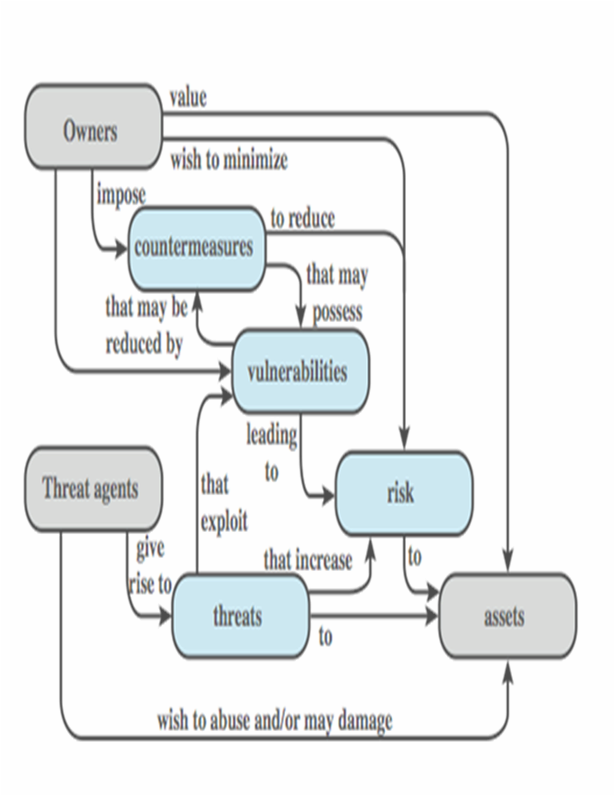
- Owners
- Threat agents
- Assets
- Vulnerabilities
- Threats
- Countermeasures
- Risk
History
- WarGames
- 1983 movie that brought security to light
- Young man finds a back door into a military super computer to run a nuclear war simulation, believing it to be a computer game. Causes a national nuclear missile scare and nearly starts WW III
- 1988 — Morris worm
- Millions of dollars and thousands of hours wasted
- First real global attack
- Still a wide open issue
Security by Obscurity
- If we hide the inner workings of a system, it will be secure?
- ¡Bad idea!
- Less and less applicable in the emerging world of vendor independent open standards
- Less and less applicable in a world of widespread computer knowledge and expertise
Security by Legislation
⚢ ⚤ ⚣
- If we instruct our users on how to behave, we can secure a system?
- ¡Bad idea!
- User awareness and cooperation is important but cannot be the principal focus for achieving security
- Human beings tend to defy authority
Weakest Link In Computer Security
- Human beings are often considered the weakest link
- 95% of all attacks were directed against the home computer user in 2007
- Go ahead—just try to prevent your relatives from installing malware!
- End-users are frequently exposed to security risks through routine on-line activities such as checking email or web browsing
- Many recent attacks indicate that end-users are increasingly becoming a new form of threat in cyber-space, the so-called unwitting accomplice
Vulnerabilities, Threats and Attacks
- System resource vulnerabilities
- Be corrupted (loss of integrity)
- Become leaky (loss of confidentiality)
- Become unavailable (loss of availability)
- Attacks are threats carried out and may be
- Passive
- Active
- Insider
- Outsider
Vulnerabilities
- Bad/default passwords.
- Unused services with open ports.
- Unpatched software vulnerabilities.
- Transmitting confidential data in cleartext.
- Open modems or wireless networks.
- Physical access to critical systems.
- Uneducated users.
Vulnerability Databases
- Repository for vulnerability data
- Security checklists
- Security related software flaws
- Misconfigurations
- Impact metrics
- National Vulnerability Database (NVD)
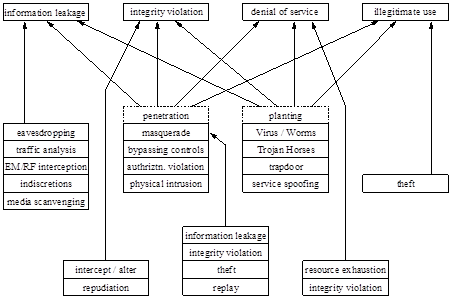
Some Common Security Threats
Threat Motives
- Financial motives
- Identity theft
- Phishing
- Spam
- Extortion
- Botnets
- Political motives
- Danish sites hacked after Mohammed cartoons.
- Personal motives
- Just for fun.
- Insider revenge.
Threat Consequences
- Unauthorized disclosure
- Exposure, interception, inference, intrusion
- Deception
- Masquerade, falsification, repudiation
- Disruption
- Incapacitation, corruption, obstruction
- Usurpation
- misappropriation, misuse
Attacks
- Classified as passive or active
- Passive attacks are eavesdropping
- Release of message contents
- Traffic analysis
- Are hard to detect so aim to prevent
- Active attacks modify/fake data
- Masquerade
- Replay
- Modification
- Denial of service
- Hard to prevent so aim to detect
How Systems Are Attacked
- Burglarize office ⇒ Obtain backup media ⇒ Steal customer data
- Bribe admin at ISP ⇒ Intercept email ⇒ Steal customer data
- Hack remote user’s home system ⇒ Intercept email ⇒ Steal customer data
- Hack SMTP gateway ⇒ Intercept email ⇒ Steal customer data
- Hack SMTP gateway ⇒ Hack thru firewall into internal network ⇒ Hack into fileserver ⇒ Steal customer data
Types of attacks
- Social engineering
- Cold calls, shoulder surfing, phishing,
- Alleviated by training, communication, etc.
- Software vulnerabilities
- Buffer overflows, known bugs
- Patching
- Configuration errors
- Complex — takes time and knowledge to do it right
- Easy to bypass
Risk Management
Risk is the relationship between your assets, the vulnerabilities characteristic to those assets, and attackers who wish to access or modify those assets.
Security Tips
- Packet filtering
- Unnecessary services
- Software patches
- Backups
- Passwords
- Vigilance
Rules of Thumb
- Don’t put files of interest on your system (good luck with that)
- Security policy should specify how info is handled
- Don’t provide homes for hackers
- Set traps to detect intrusions
- Monitor reports from your security tools
- Teach yourself about security
- Be nosy—prowl around looking for unusual activity
Password management
- Poor password management is common weakness
- Indirect information
- Passwords easily hacked
- Steps
- Run the common password checker often
- Check for null passwords
- Or just don’t permit them in the first place
- Password maintenance
- Password aging
- No group logins
sudo
SetUID programs
- Prone to security holes
- Minimize the number of them
- Use pseudo-users with just the required privilege, rather than using root
- Disable on public filesystems, e.g., USB auto-mounter
Security issues
- Remote event logging
- Use syslog
- Secure terminals
- Configure to disable root logins from SSH, VPNs, etc
- Best to just disable root logins from anywhere, except perhaps the system console.
- Configure to disable root logins from SSH, VPNs, etc
- NIS — known to have security issues
- NFS4 — security enhancements
- Sendmail — runs as root
- Keep up to date
Security issues — continued
- Viruses and worms
- Not widely prevalent on Linux
- Less market share than Windows
- Access controlled environment
- Trojan horses
- Programs get Trojan horses embedded in them
- Keep software up to date
- Rootkits
- Hiding system information
Assets
- Login account
- Network bandwidth
- Disk space
- Data
- Reputation
Defenses
- Vulnerability mitigation
- Use secure authentication systems.
- Deploy software in secure configuration.
- Patch security flaws quickly.
- Attack mitigation
- Firewalls to prevent network attacks.
- IDS to detect attacks.
- Virus/spyware scanners.
OS Hardening
- Make it difficult:
- Secure the physical system.
- Install only necessary software.
- Keep security patches up to date.
- Delete or disable unnecessary user accounts.
- Use secure passwords.
- Disable remote access except where necessary.
- Use
sudoinstead ofsu. - Run publicly accessible services in a jail.
- Check logs regularly.
- Configure firewall on each host.
- Run security scanner to check security.
- Document security configuration.
Secure the physical system
- Place servers in a physically secure location.
- Physically secure the case.
- Place ID tags on all hardware.
- Password protect the BIOS.
- Disable booting from removable media.
- Security cameras (detection, not prevention)
Install only Necessary Software
- Put different services on different hosts.
- A compromise in the web server shouldn’t compromise mail.
- Improves reliability and maintainability, too.
- Common unnecessary packages
- X-Windows
- Software development (gcc, gdb, etc.)
Security Patches
- Subscribe to vendor security patch list.
- Or know vendor’s update schedule.
- Patch Tuesday: MS Windows updates on second Tuesday of the month
- Or know vendor’s update schedule.
- Update test host first.
sudo apt update; sudo apt dist-upgrade- Patches can sometimes break services.
- Update other hosts after that.
- May need to schedule downtime if reboot required.
Use Secure Passwords
- Attacks against Passwords
- Password sniffing
- Password guessing via login
- Password cracking
- Defenses
- Do not transfer passwords over the network.
- Secure
/etc/{passwd,shadow} - Configure password quality/aging rules.
- Test your passwords by cracking them.
- Use the most up-to-date password encryption!
PAM
Problem:
- Many programs require authentication.
passwd,chsh,ssh, etc.
- New authorization schemes require rewrites.
- longer passwords, keys, one-time passwords
Solution:
- Separate authentication from programs.
- Store authorization in Pluggable Authentication Modules.
- Programs choose PAMs to use at runtime by reading config files.
PAM Configuration
- Configured under
/etc/pam.d - Each PAM-aware service has a file there.
Format: module-interface control-flag module-name module-arguments
- Module-interface: one of 4 module types.
- Control-flag: how module will react to failure or success (multiple successes may be required.)
- Module-name: PAM shared library.
- Module-args: Files to use, other options.
Module Interfaces
- auth — Authenticates use of service. For example, it may request and verify a password.
- account — Verifies that access is permitted, e.g. check for expired accounts or location/time.
- password — Sets and verifies passwords.
- session — Configures and manages user sessions, e.g. mounting user home directories or mailboxes.
Module Stacking Example
rlogin PAM requirements
- The file
/etc/nologinmust not be present. - Root may not login over network.
- Environment variables may be loaded.
~/.rhostsentry allows login without password.- Otherwise perform standard password login.
PAM config file:
    auth required pam_nologin.so
    auth required pam_securetty.so
    auth required pam_env.so
    auth sufficient pam_rhosts_auth.so
    auth required pam_stack.so service=system-auth
Control Flags
required— Module result must be successful for authentication to continue. User is not notified on failure until results on all modules referencing that interface are available.requisite— Module result must be successful for authentication to continue. User is notified immediately with a message reflecting the first failed required or requisite module.sufficient— Module result ignored if it fails. If a sufficient flagged module result is successful and no required flagged modules above it have failed, then no other results are required and the user is authenticated to the service.optional— Module result is ignored. Only necessary for successful authentication when no other modules reference the interface.
Password Quality
- Use
pam_cracklib.soin system-auth - Options:
retry=#: Maximum # of retries.minlen=#: Minimum password length.lcredit=#: Min # of lower case letters.ucredit=#: Min # of upper case letters.dcredit=#: Min # of digits.ocredit=#: Min # of other chars.
Password Aging
- Configure
/etc/login.defsbefore creating accounts:- PASS_MAX_DAYS: Max # of days before password expires.
- PASS_MIN_DAYS: Min # of days before user can change pw.
- PASS_WARN_AGE: # of days for pw change notice given.
- Also configure
/etc/default/useradd:- INACTIVE: # of days after pw expiration that account is disabled.
- EXPIRE: Account expiration date in format YYYY-MM-DD.
- Remember old passwords with
pam_unix.so:- Prevents users from changing password back to old value.
- Modify
/etc/pam.d/system-auth - Set pam_unix.so option remember=26
- Create
/etc/security/opasswdto store old passwords.
Disable Unnecessary Accounts
/etc/passwdcontains application accounts.- Delete unnecessary application accounts.
- uucp, games, gdm, xfs, rpcuser, rpc
- All should have locked passwords.
- Set shell to
/bin/noshellor/bin/false.
- Delete unnecessary application accounts.
- Disable user accounts immediately on termination of employment.
- “immediately” doesn’t mean “soon”. It means “before”.
- Sure, keep the data around, but lock the account.
Disabling Remote Access
- Disable cleartext protocols
- telnet, ftp, rsh, rlogin
- Remove the packages, or
chmod -xthe executables.- Of course, a future update may “fix” the file permissions.
- Disable root access via ssh.
- Set
PermitRootLoginto “no” insshd_config
- Set
- Remove root non-terminal consoles
- Set in
/etc/securetty
- Set in
- Disable password access via ssh
- Use keys instead.
- A bold move
- Use keys instead.
sudo
- Login as root only for single-user mode.
- Use
sudoinstead ofsu.- On my system,
roothas no password. One simply cannot log in as root;sualways fails.
- On my system,
- Advantages:
- Uses user password instead of root’s password.
- Logs who executed what commands as root.
- Can delegate limited powers to some users.
Jails
- Complete isolation: virtual machines.
- Partial isolation: chroot
chroot /var/httpd httpd- chroot filesystem needs:
/var/httpd/etc: limited/etc/{passwd,shadow,group}/var/httpd/usr/libshared libraries/var/httpd/bin: extra binaries/var/httpd/var/log: log space/var/httpd/tmp: temporary space
Check Logs
- Review logs every morning.
- Better yet, have a program scan them.
- Send logs to a central server for
- security: attacker can’t hide tracks by deleting
- ease of use: you can read all logs in one place
Firewalls and Intrusion Prevention Systems
- effective means of protecting LANs
- internet connectivity essential
- for organization and individuals
- but creates a threat
- could secure workstations and servers
- also use firewall as perimeter defense
- single choke point to impose security
Firewall Capabilities & Limits
- capabilities:
- defines a single choke point
- provides a location for monitoring security events
- convenient platform for some Internet functions such as NAT, usage monitoring, IPSEC VPNs
- limitations:
- cannot protect against attacks bypassing firewall
- may not protect fully against internal threats
- improperly secure wireless LAN
- laptop, PDA, portable storage device infected outside then used inside